
What is AudioSlice? 🎵🗡️
AudioSlice (download) is the most advanced realtime music analyzer in the world. (If you find a better one, please let us know. Seriously.)
This software (and its small but mightly quantized all-CPU neural network) has been used to power live visuals at venues like Coachella and EDC Las Vegas, and for artists like John Summit, Dom Dolla, Gorgon City, GRiZ, Francis Mercier, Charlotte DeWitte, and countless others.
AudioSlice has a simple goal: listen to a raw stream of music (of any genre) like an experienced human musician would and output signals faster than a human ever could: powering the pulsing, breathing parameters of your visuals, hour after hour, tirelessly.
You are an artist. Not a tempo tapper, not a drum hit detector, not a faster moving fader, and not a computer.
Focus on how your visuals will look and perform with parameters, scenes, clips, and colors that take place over seconds, minutes, or hours -- not milliseconds.
AudioSlice is cross platform (Mac and Windows) and needs a clean audio connection (not a mic), but requires no other integrations or software: no ShowKontrol, no ProDJ link, no Ableton Link, nothing. Just pure audio in, OSC out, every 11 ms.
See our tutorials here!
AudioSlice supported signals
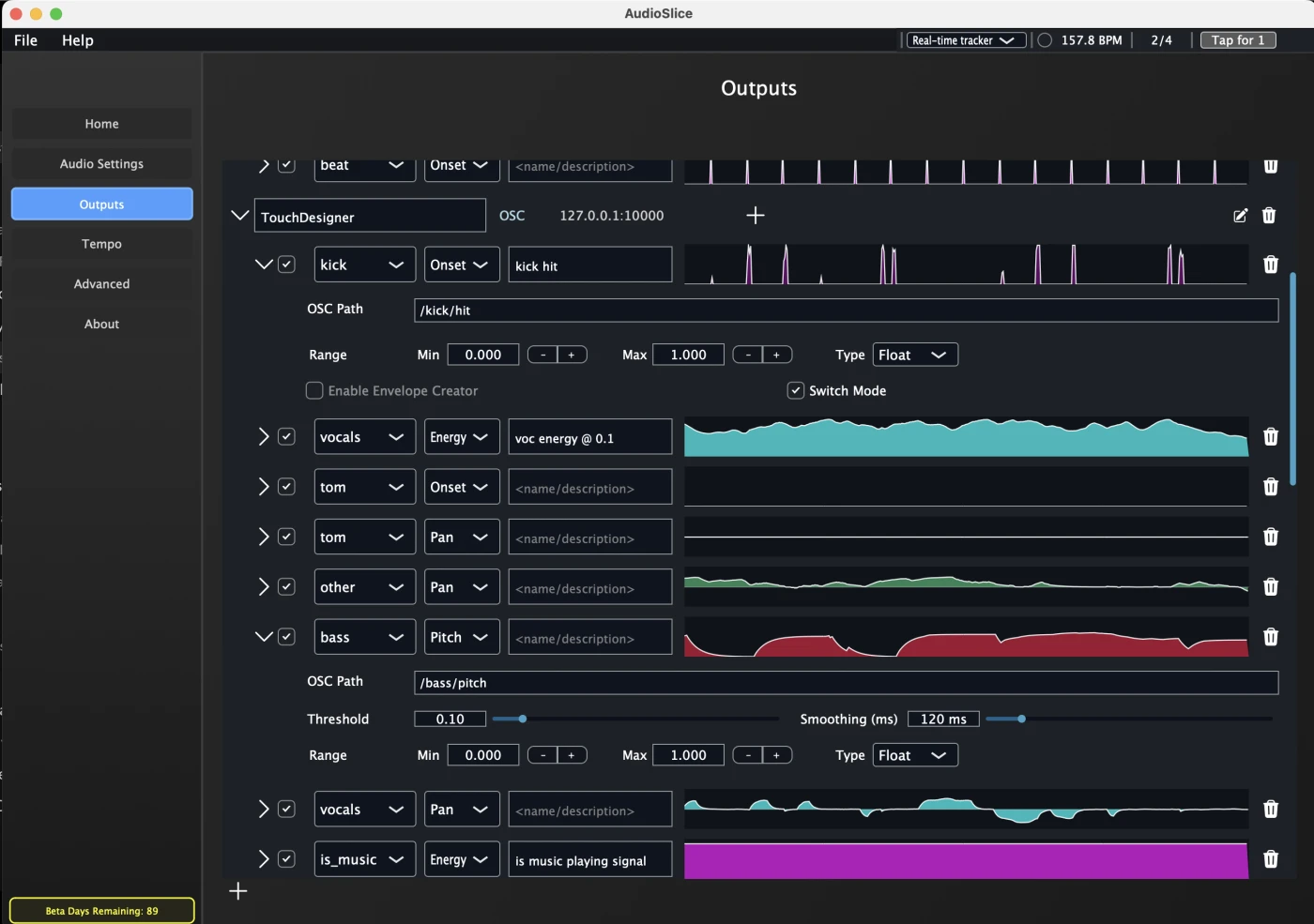
Each kind of stem output can output multiple types of signals, like loudness, onsets, pan, pitch and spread, depending on the signal type.
By default, outputs are scaled dynamically to a [0, 1] range, but you can adjust min/max and even invert the range per modulator.
Onsets are events and only fire on changes, all other signals are continuous and fire every frame.
| Source | Loudness | Onsets | Pan | Spread | Pitch | Accuracy |
|---|---|---|---|---|---|---|
| All drums | 🔵 | — | — | — | — | High |
| Kick | 🔵 | 🔴 | — | — | — | High |
| Snare | 🔵 | 🔴 | 🟡 | 🟣 | — | High |
| Hi-hat | 🔵 | 🔴 | 🟡 | 🟣 | — | High |
| Tom | 🔵 | 🔴 | 🟡 | 🟣 | — | Moderate |
| Percussion | 🔵 | 🔴 | 🟡 | 🟣 | — | Low |
| Entire Mix | 🔵 | 🔴 | — | — | — | High |
| Vocals | 🔵 | — | 🟡 | 🟣 | 🟢 | High |
| Bass | 🔵 | — | — | — | 🟢 | High |
| Other (everything else) | 🔵 | — | 🟡 | 🟣 | — | Moderate |
| Beat / downbeat | — | 🔴 | — | — | — | High |
| Is music? | 🔵 | — | — | — | — | High |
See modulators to learn more.
Built for live performance
- Works offline. No cloud connection. AudioSlice runs entirely locally.
- It runs on CPU. Your GPU is meant for visuals, not audio analysis. AudioSlice uses around 2% of CPU and around 300-600 MB of RAM. Less than a Chrome tab.
- It only needs audio. No Pro DJ Link, no click track, no Ableton Link required.
- It tracks tempo. Understands beats and where the "1" is, follows tempo changes live, and can sync to Ableton Link (see Tempo and Beats).
- Portable configuration. Save and load your setups, modulators, and routings with simple JSON files.
System requirements
AudioSlice works on both Windows and Mac OS X.
| Requirement | |
|---|---|
| macOS | 11 or later, Apple Silicon (M1 or newer) |
| Windows | 10 or 11, 64-bit |
| Audio in | Any input the OS exposes — an interface, a virtual loopback device, or the built-in microphone |
| Somewhere to send it | TouchDesigner, Resolume, MadMapper, Synesthesia, or anything else that speaks OSC |
On Mac we recommand virtual audio cables like Blackhole or Amoeba Loopback.
For Windows NO virtual audio cable is needed! Say goodbye to configuring VB Cable or Voicemeeter Banana.
Where to download
AudioSlice is available in our online shop, with a 30-day free trial.
After 30 days, the app will still function but no OSC will be output.