
Realtime musical outputs (modulators)
Finally, the fun part: the things the AudioSlice engine can output to your visuals.
The engine updates once every 11ms, and runs light as a feather: no GPU usage, and around 2-3% of CPU generally (300-600 MB of RAM). Less than a Chrome tab.
Here's a quick reference of the availiable signals:
| Source | Loudness | Onsets | Pan | Spread | Pitch | Accuracy |
|---|---|---|---|---|---|---|
| All drums | 🔵 | — | — | — | — | High |
| Kick | 🔵 | 🔴 | — | — | — | High |
| Snare | 🔵 | 🔴 | 🟡 | 🟣 | — | High |
| Hi-hat | 🔵 | 🔴 | 🟡 | 🟣 | — | High |
| Tom | 🔵 | 🔴 | 🟡 | 🟣 | — | Moderate |
| Percussion | 🔵 | 🔴 | 🟡 | 🟣 | — | Low |
| Entire Mix | 🔵 | 🔴 | — | — | — | High |
| Vocals | 🔵 | — | 🟡 | 🟣 | 🟢 | High |
| Bass | 🔵 | — | — | — | 🟢 | High |
| Other (everything else) | 🔵 | — | 🟡 | 🟣 | — | Moderate |
| Beat / downbeat | — | 🔴 | — | — | — | High |
| Is music? | 🔵 | — | — | — | — | High |
The magic of AudioSlice is that the neural net at the heart of the engine adapts to almost any genre, BPM, or style you can throw at it.
🏆 This differs significantly from most FFT-based trigger systems, which simply use FFT-magnitude (highly weighted towards low frequencies), and require constant fiddling with thresholds and filter cutoffs as genres, BPMs, and songs change.
Creating a new modulator
Just click on the plus icon to the right of the Output group's host:port:

Then from there, you can select the modulator's stem and type.
Select modulator stem
The stem is the kind of instrument or "thing", here are some example choices:
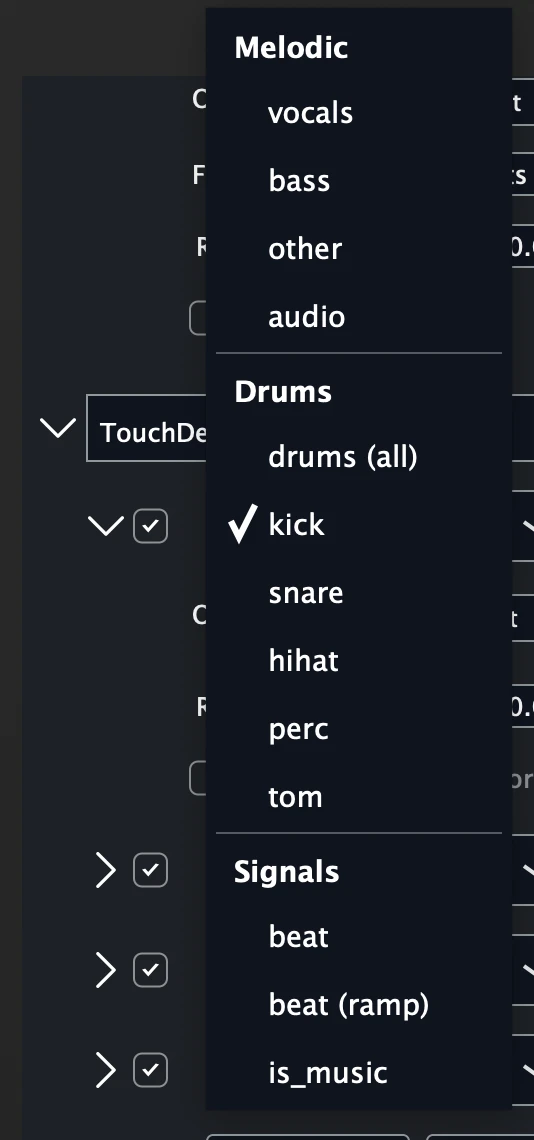
Largely, they are grouped into three categories:
- Melodic: harmonic
- Percussive: atonal, "hits"
- Special: is music, beats, beat ramps, etc
Select modulator type
Once you have selected your stem, you can select the type:
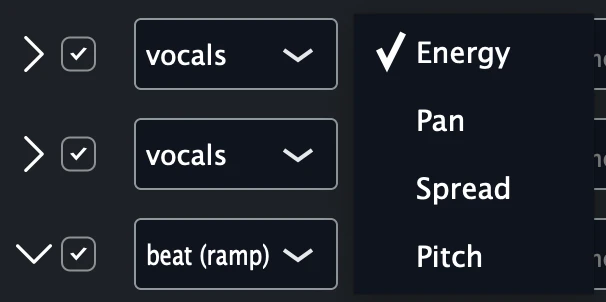
The type is conditional on the stem. For instance, vocals doesn't have onsets, nor do hihats have pitch!
Mostly, these choices reflect musical realities, but sometimes it reflects what we were capaable of training into the network. We didn't want to give anyone signals that were not accurate or useful.
Output types
Energy (loudness)
A continuous signal representing the k-weighted loudness of this element in the mix, scaled to the 0-1 range.
Every frame, a value is sent, unless the value didn't change
Energy outputs are best used for modulating things that should vary instantaeously: size, speed, brightness, and so on.

You can adjust:
Threshold: acts as a gate. You can filter out lower-loudness hits. We recommend keeping this value at the default, thoughSmoothing: a weighted moving average, applied to the signal, expressed in milliseconds update time. This is more useful for melodic elements likebass,other, orvocals, but don't let us yuck your yum!Range: defaults to0-1where silence is0and loudest so far is1, but if you'd like silence to be100and loudest possible to be69, you can do that!Type: FLOAT will output the value, INT will round to 0 or 1
For shaping the signal based on musical lengths using ADSR-like shapes, you can enable the Envelope Creator on the bottom. See Envelope Creator to learn more.
Onsets
A discrete event: did this hit or event happen? And if quantifiable, how "strong" was the event?

Onsets traditionally should be used with Switch enabled ON, as this means they emit single messages per "hit". This is great for triggering new clips, changing scenes, or generally events in your visuals that require discrete events rather than a continuous stream of values.
Onsets have the following parameters:
path: OSC pathtype: FLOAT for the floating point "strength" of each hit0-1, INT for1on hitsthreshold: only emit hits above this level on0-1scale. It's not good practice to constantly twiddle with this, the entire point of AudioSlice is that it is quite intelligent about detecting hits and you don't need to babysit it. However, some users like being able to have different settings, ie: one hihat for offbeat "main" hihats (higher threshold), and another for the 16th note straight hats underneath it (lower threshold)range: emit values frommintomax.mincan be greater thanmaxor vice versa
Finally envelope creator can be used on onset types as well, see Envelope Creator to learn more.
Beats
AudioSlice understands not only beats, but downbeats as well and is able to know "where the 1 is".
This is an embarassingly difficult task across every genre for a model of our size and speed, and we think you'll find it a wonderful tool in your live-visuals-busking toolkit.
We do only support the 4/4 time signature at this time. RIP your 3/4 waltz visuals.
Beat onsets
You can set an OSC message to be fired only once (Switch mode ON), right on beat starts, and fire an INT value of 1:

Beat shapes
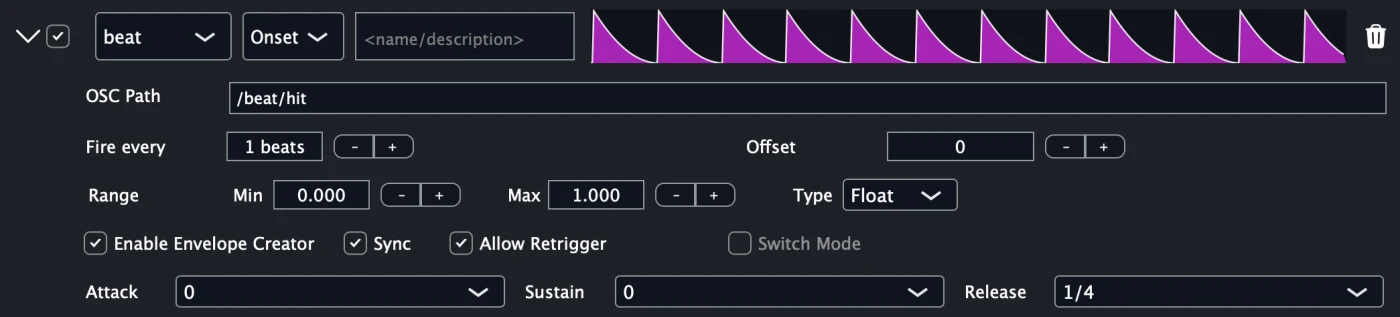
Or use envelope creator to create shapes, firing FLOAT values in your range, sync'd to the music's BPM, with a decay of quarter notes:
Beat triggers every N beats
Or perhaps the most useful, trigger single beat events (Switch mode ON again), every N beats. Useful to trigger new scenes or color palettes.

While AudioSlice can detect downbeats (1 vs 2, 3, 4), if you'd like your N beats to "start" at a particular point, you can use the Tap button to sync your phrase starts:

Later models will do phrase change detection, but for now this offset is a little manual.
Beat triggers N times every beat (Beat Divisions)
Kind of the inverse of the above. You can trigger sub-beat firings, for instance to fire on every 16th note, but only every 4 notes:
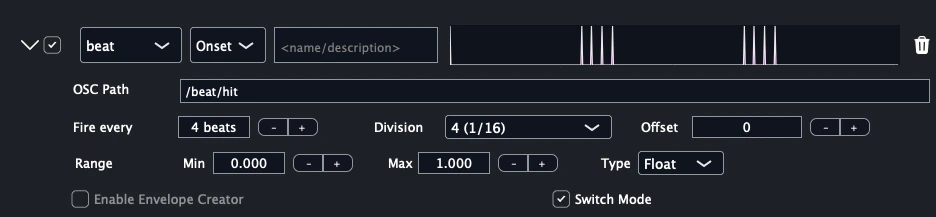
We got this feature request a lot from laser operators.
Beat offsets: a sneaky feature
A sneaky but important feature is Offset which allows you to create events that fire on beat numbers like once every 128 beats, but with a sliiight offset in the nunmber of 11ms frames. This is great for triggering multiple OSC messages to trigger at the same time but ensuring that one comes before another.
As an example, switching the deck in Resolume, but also clicking play on the first column, every 128 beats:
- Every 128 beats, offset 0: trigger change to next deck
- Every 128 beats, offset 1: play column 1
It's a little hacky but works well to send a "packet" of OSC messages while ensuring ordering.
Here's what it looks like to delay a single frame:

Beat ramps
You can also create "ramps" which go up or down over the course of N beats:
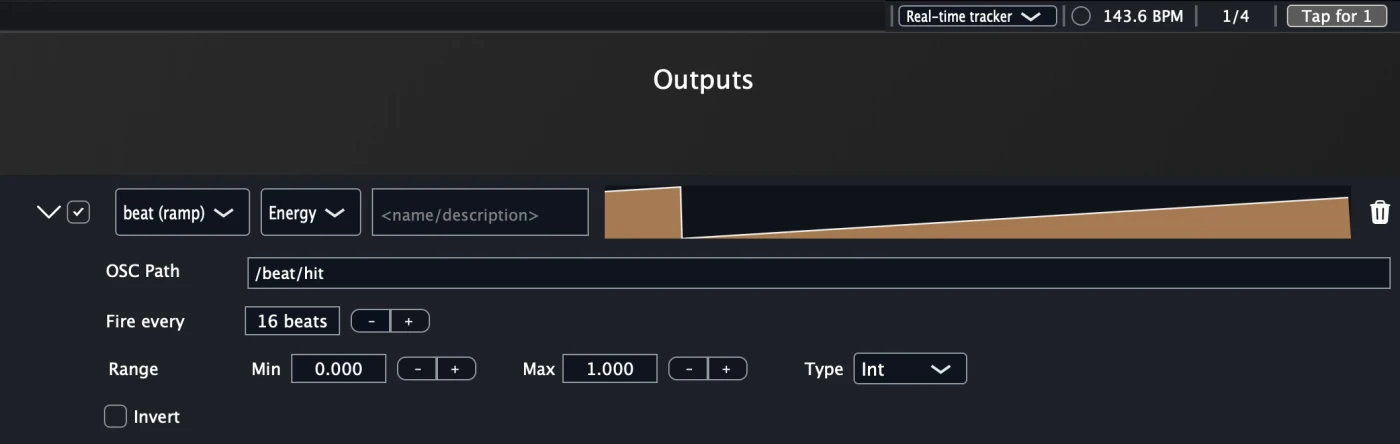
While AudioSlice can detect downbeats (1 vs 2, 3, 4), if you'd like your beat ramp to "start" at a particular point, you can use the spacebar key to sync your phrase starts:
Later models will do phrase change detection, but for now this offset is a little manual.
Pitch
For vocals and bass, AudioSlice traces the extracted pitch contour in realtime.
While the network is capable of extracting semitones (exact pitch), we only output the 0-1 scaled movement of that element, since in visuals the relative movement is what's important.
(Otherwise music in different keys to occupy different visual range than others.)

Often a threshold in the 0.1-0.2 range with a smoothing in the 20-50ms range tends to look quite good.
Note also that "silence" for the pitch modulators maps to the min of the range, or at default, 0.0.
Pan
The position in the stereo field of the stem. The midpoint ((min+max)/2, or 0.5 as default) is center, while left and right values deviate from center either towards min or max of your modulator's range.

In general the engine "exagerates" this value to make for more dramatic visuals. Feel free to smooth or threshold it.
Spread
The wideness of the extracted stem in the stereo field. min value is completely mono, while max would be as wide as possible.

Here also, the engine "exagerates" this value to make for more dramatic visuals. Feel free to smooth or threshold it.
Output stems
A quick taxonomy on what we defined as a particular stem.
You may not agree, there are no "correct" choices here. But based on talking to many visual artists about what musical elements they wanted to map visual events to, these are the rough decisions the network is trained on
Stem taxonomy
Kick: self-explanatory, will trigger unless high-passed significantlySnare: claps, snares, and rimshotsHiHats: open & closed, shakers, and some other high frequency rhythmic hits. Does NOT include cymbals, or rides.Toms: mostly used in drum fills, the kind you'd find on a drum kitPerc: large misc category, which has lower accuracy. Congas, cowpells, triangles, and a list far too long to enumerate hereVocals: any leading vocals, or melodic elements in a chorus that substitute for them (ie: guitar solo, sax solo, etc). Background vocals or vocal stutters are binned intootherBass: low frequency, melodic. Includes upper harmonics of bass elements, which can be quite dramatic in some genres like dubstepOther: the garbage disposer of stems. Everything else. Guitar, piano, synths, FX, background vocals, vocal stutters, etc.
Ultimately, no one will quite agree on a perfect taxonomy, so in later versions we will allow for even more granular separation of stems.