
Tempo
AudioSlice tracks the beat from the audio itself.
No tapping, no click track, no timecode: it follows tempo changes live as the set moves.
It also tracks not only beats, but downbeats, and knows beat 1 vs 2, 3, or 4.
Beat and tempo tracking
Tracking runs on the same audio you selected in Audio input and produces a tempo and a beat grid.
Give it a bar or two of steady material to settle on a new track. Sparse intros and ambient passages have less to lock onto than a four-on-the-floor groove.
If you're just clicking through tracks to find something good to build your visuals on, you might need to wait a little bit for the tempo tracking to adjust. AudioSlice is largely made for tracking live concerts or DJ sets throughout an entire set (or sets!).
Alternatively, just tap 0 key on your keyboard - this resets the model's "state" (its brain) and it should hear the track you're listening to with fresh ears.
Tempo settings
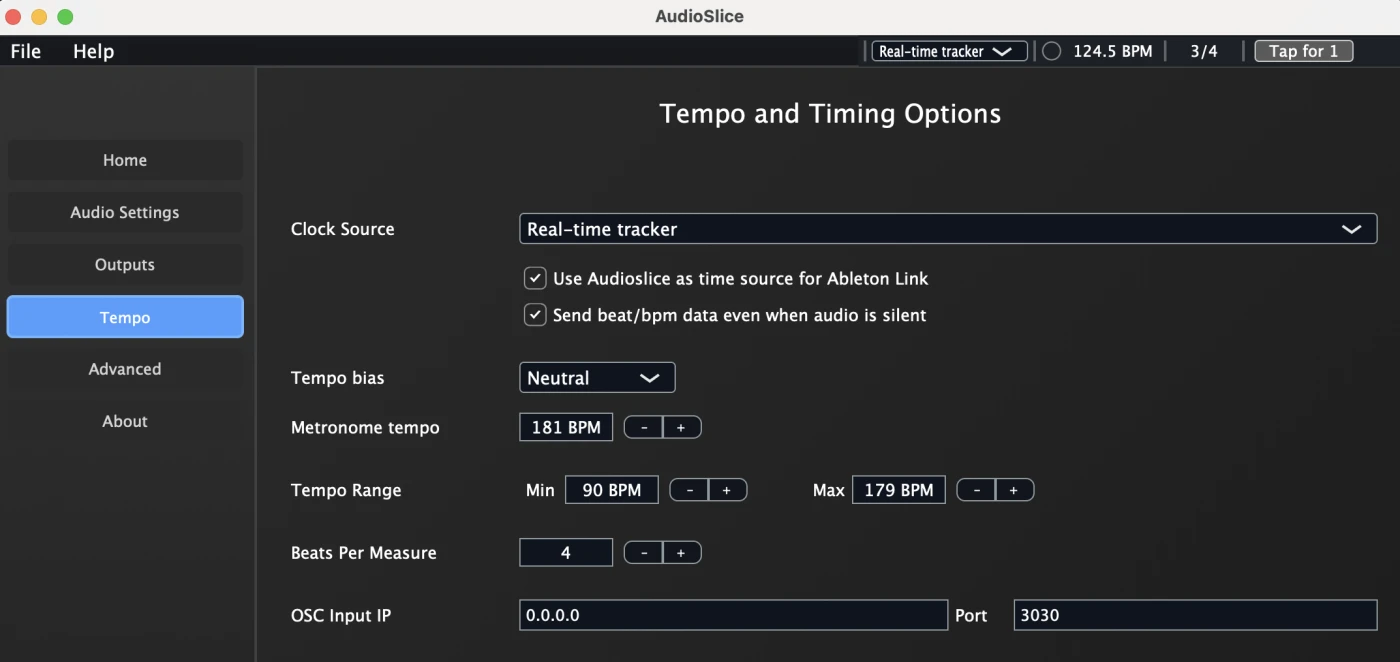
We recommend keeping the defaults here.
The one exception is that we find VJs like to 0.5x or 2x tempo with the 1 and 2 keyboard shortcuts, respectively. AudioSlice often understands by genre whether something is say, hiphop at 87 BPM vs 174 BPM drum & bass, but occasionally you might have a different point of view 😃
1 halves the tempo when it's 160 BPM or faster (174 → 87); 2 doubles it when it's 90 BPM or slower (87 → 174).
Experimental: Responsiveness slider
The Responsiveness slider sets how quickly the beat grid follows a tempo change. At its lowest the grid rides steadily through breaks and drops and takes a little while to adopt a new tempo, which suits live performance. At its highest it jumps to a new tempo within a few seconds, which suits auditioning tracks at unrelated tempos, at the cost of a grid that wanders more during breaks.
Resetting the tracker
If tracking has latched onto the wrong tempo or phase, for example right after a hard cut to a track at a very different tempo, press 0 to reset it. This clears what the tracker has learned from the audio so far, and it re-locks from the music that follows.
Keyboard shortcuts
Of these, realistically most users only ever use 0 when auditioning and trying out visuals at home, and sometimes 1 or 2 during a show. 1 and 2 essentially function as halving or doubling tempo for the model's beat tracking. So if you're seeing the model guess 174bpm, but you prefer the slower feel of 87bpm, just hit 1.
| Key | Action |
|---|---|
| Space | Tap tempo (when a tap button is shown) |
| 0 | Reset the tracker |
| 1 | Prefer slower tempos (0.5× tempo) |
| 2 | Prefer faster tempos (2× tempo) |
| 3 | No tempo preference |
Note: You should NOT need to tap tempo with spacebar. AudioSlice will literally do it for you. But some habits die hard, and some VJs just want it there if they need it. We won't stop you from tapping if you really want to!
Resetting the model state with 0 can be useful if you're just clicking around auditioning tracks and you, like us, enjoy the ADHD bliss of listening to random 10-15 second segments for hours, watching shaders react and pulse.
Do note however, that AudioSlice's splitter model is trained on (at shortest!) 12 second segments. So just know that if you listen to anything shorter than that, technically the model is still warming up, and the results you get before that may be suboptimal!
Ableton Link
AudioSlice can share tempo and beat phase across every Ableton Link-enabled app on the network. Enable it on both ends and they negotiate automatically — there's no host to pick and nothing to configure.
It works in both directions:
- AudioSlice as the source: AudioSlice beat grid drives Ableton Live, Resolume or anything else on the session.
- AudioSlice as a follower: if Live is already the clock, AudioSlice locks to it instead of deriving its own.
Setting your clock source
AudioSlice defaults to the realtime beat tracker, but if you'd prefer AudioSlice follow an Ableton Link source, or just click on an endless metronome, you can select that, too.

See also
- Output groups: getting the signals across
- BeatSage: if tempo is all you need, it's a more accurate model and it works on microphone input in high SPL environments